
Expense allocation (periodic allocation)
The expense allocation functionality is available in the Pro plan. Automatic periodic allocation allows you to generate all future entries at once when entering a purchase invoice. This eliminates the need to manually allocate expenses using general ledger entries.
Purchase invoice allocation
To allocate a purchase invoice, open a saved invoice and select More – Allocate. In the window that appears, you can configure the allocation settings.
Allocation settings
-
Number of periods (in months): Specify the desired duration, from 1 to 120 months.
-
Period start date: By default, this is set to the invoice date, but it can be adjusted as needed.
-
Expense account: The account used for the periodic allocation entries.
-
Lines to be allocated: All purchase invoice lines (description, amount, currency, object) are displayed. You can select specific lines by ticking or unticking them. By default, all lines are selected.
Allocation entries
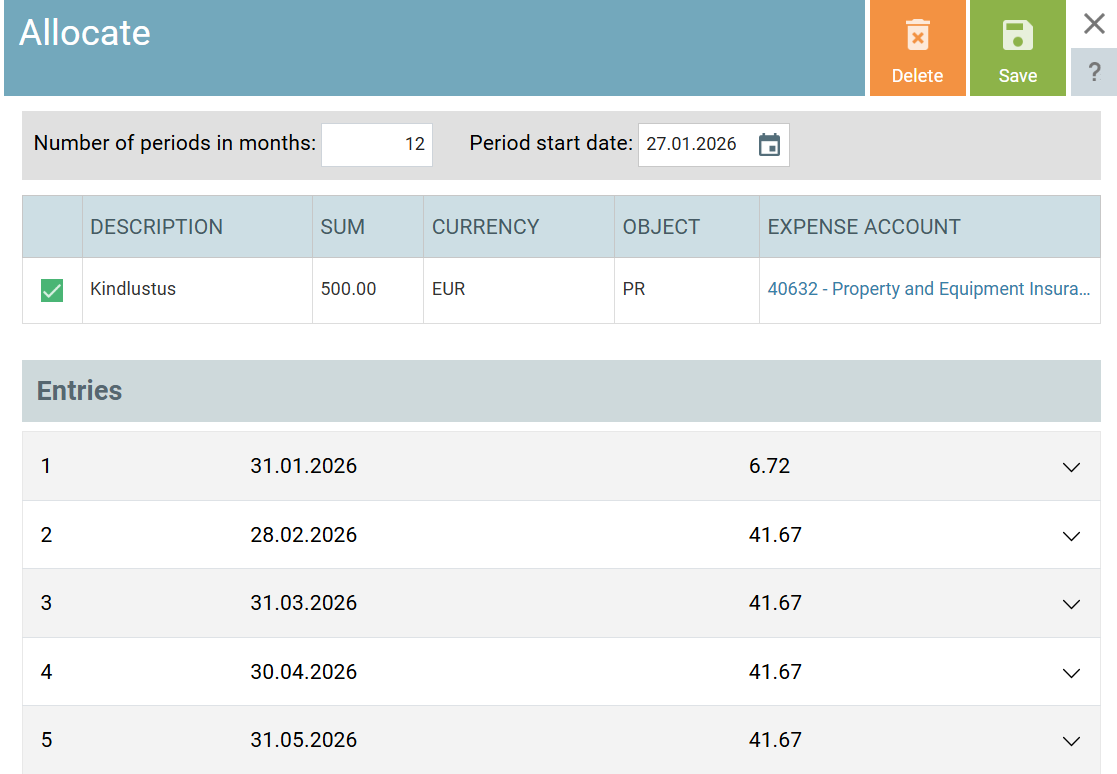
Once the settings are saved, the system generates general ledger entries based on your configuration.
Entries are generated on the last day of the month (except for the final entry).
Example: If the allocation start date is 10 January 2025 and the expense is allocated over 12 months, the entry dates will be:
31.01.2025, 28.02.2025, 31.03.2025, …, 09.01.2026.
-
Debit account: The expense account specified during the allocation setup.
-
Credit account: The account selected on the original purchase invoice line.
Calculation of allocation amounts
If 1000€ is allocated over 12 months starting 10 January 2025:
-
Standard periods (2nd to 11th):
1000 / 12 = 83.33€ -
First period:
(1000 / 12) / 31 *22 = 59.14€ -
Final period:
(1000 / 12) / 31 * 9 = 24.19€ + 0.04€* = 24.23€
*The 0.04€ represents the rounding difference, calculated as:
All calculations are converted into euros using the exchange rate of the purchase invoice.
Allocations and missing financial years
If allocation entries extend into a period for which a financial year does not yet exist, the system will automatically create one based on the settings of the previous financial year.
Allocation entry numbering
Automatic allocation entries use the purchase invoice general entry type (OA). Entries are numbered as follows:
OA-1/1, where OA-1 is the purchase invoice entry number and /1 is the sequential number of the allocation entry.
Modifying or deleting allocated invoices
-
Changes: If an allocated invoice is modified, the allocation must be updated. Open the allocation (via the Linked documents section of the invoice), click Refresh, and save.
-
Deletion: If an allocated purchase invoice is deleted, all related allocation entries are also removed.
-
Validation: When saving or deleting allocations, the system ensures the action is not performed within an inactive financial year or a locked period.
Periodic allocation